How to Use Google Gemini for Work and Business
Google Gemini can help business owners work faster, but only when it is used with structure. You can use it to draft emails, summarize documents, research markets, create marketing plans, improve reports, analyze customer questions, and build content ideas.
Originally published by Time Booster Marketing
How to Use Google Gemini for Work and Business
Google Gemini can save time in business, but it will not fix unclear thinking.

If your offer is vague, your customer data is messy, your documents are scattered, and your marketing strategy is weak, Gemini may help you produce more words faster, but not necessarily better business results.
Used properly, however, Gemini can become a practical work assistant. It can help you draft emails, summarize long documents, prepare meeting notes, research competitors, generate campaign ideas, create content outlines, organize customer questions, and turn raw thoughts into usable business documents.
Google describes Google Workspace with Gemini as an AI-powered collaborative partner that can help across apps such as Gmail, Docs, Sheets, Slides, Drive, and Chat, depending on your organization’s access and settings. (support.google.com)
Start With the Right Mindset
Do not use Gemini as a replacement for business judgment.
Use it as a thinking partner.
A business owner in Cameroon, Nigeria, Ghana, Kenya, South Africa, or the diaspora still needs to understand customers, pricing, trust, local market behavior, language, delivery constraints, WhatsApp communication, and buying objections. Gemini can help organize that thinking, but you must provide the context.
A weak prompt says:
Write a marketing plan.
A stronger prompt says:
Create a 30-day WhatsApp marketing plan for a salon in Douala targeting working women aged 25–45. Include Status content ideas, customer follow-up messages, appointment reminders, and weekly performance metrics.
Gemini becomes more useful when your instruction is specific.
Use Gemini Inside Google Workspace
If your business already uses Gmail, Docs, Drive, Sheets, Slides, Calendar, Meet, or Chat, Gemini is most useful when it works inside your existing workflow.
Google says Gemini in Workspace can help users write and refine emails in Gmail, draft and summarize documents in Docs, generate insights from Drive files, and work inside other Workspace apps depending on available features and admin settings. (support.google.com)
That matters because business work rarely happens in one place. A client email may require a proposal. A proposal may require pricing. Pricing may require a spreadsheet. A meeting may require notes. Gemini can help connect these steps when Workspace access is properly enabled.
1. Use Gemini in Gmail for Faster Communication
Gmail is one of the easiest places to start.
Gemini can help summarize long email threads, draft replies, improve tone, create action-item lists, and help you respond more professionally.
Useful prompts include:
Summarize this email thread and list the decisions, deadlines, and open questions.
Draft a polite follow-up email to a client who has not replied to our quotation after seven days.
Rewrite this email to sound professional, firm, and friendly.
Create a short response confirming receipt of payment and explaining the next step.
For small businesses, this is powerful because customer trust often depends on response quality. A rushed or unclear email can make your business look disorganized. Gemini helps you slow down the thinking while speeding up the writing.
2. Use Gemini in Docs for Proposals, Reports and SOPs
Google Docs is where Gemini becomes useful for business documents.
Use it to draft:
- proposals
- reports
- project briefs
- policy documents
- standard operating procedures
- blog articles
- press releases
- training materials
- partnership letters
- meeting summaries
Google’s Workspace guide explains that Gemini in Docs can help users draft, refine, summarize, generate images, create formatted documents, and match writing style or document format where available. (support.google.com)
A strong business prompt could be:
Create a one-page proposal for a small-business WhatsApp CRM setup. Include the client problem, proposed solution, implementation steps, timeline, deliverables, and success metrics. Use a clear consulting tone.
Gemini gives you a draft. You then add real pricing, examples, client context, and local business realities.
3. Use Gemini in Sheets for Planning and Tracking
Gemini can help you create tables, trackers, budgets, campaign plans, and reporting structures.
Use it for:
- sales pipelines
- marketing calendars
- customer follow-up trackers
- content plans
- expense summaries
- campaign budgets
- inventory templates
- hiring trackers
- event planning sheets
Google’s Gemini guidance for sales shows examples of using Gemini to create tables and frameworks that can later be replaced with real customer details. That is the correct approach: use Gemini to create structure, then use your actual business data to make it useful. (support.google.com)
Prompt example:
Create a Google Sheets table for tracking WhatsApp leads. Include columns for customer name, phone number, source, enquiry type, budget, stage, assigned staff, follow-up date, quotation value, and outcome.
This can turn scattered WhatsApp conversations into a simple sales-management system.
4. Use Gemini in Drive to Understand Files Faster
Business owners often have too many documents and too little time.
Gemini in Drive can help summarize files, find information, and generate insights from documents where access is enabled. Google’s Workspace documentation says Gemini in Drive can help users find files, summarize documents, and generate insights across Drive. (support.google.com)
Use this for:
- summarizing long reports
- comparing proposals
- extracting action points
- reviewing meeting notes
- finding client documents
- understanding old project files
- preparing for management meetings
Prompt example:
Summarize the main points from these project reports and identify the top three risks, missed deadlines, and recommended next actions.
This saves time, but always verify important details before making financial, legal, medical, or operational decisions.
5. Use Gemini for Research and Market Understanding
Gemini can help with research, but research must be handled carefully.
Google’s Deep Research in Gemini Apps is designed to conduct in-depth research and create reports on topics, with available features depending on the account or plan. (support.google.com)
Use Gemini for:
- competitor research
- market summaries
- customer persona development
- industry trend reports
- product comparison
- regulatory research starting points
- event planning research
- content research
- business idea validation
Prompt example:
Research the current market for WhatsApp automation tools used by African SMEs. Compare common features, pricing models, adoption barriers, and opportunities for a Cameroon-focused provider.
Do not copy research blindly. Check sources, verify dates, and confirm local relevance. AI can summarize confidently even when the information needs review.
6. Use Gemini for Marketing Strategy
Google has an official Gemini for marketing guide that shows how Workspace with Gemini can support campaign planning, budgeting, content creation, and marketing workflows. (support.google.com)
For small businesses, Gemini can help create:
- campaign briefs
- content calendars
- email sequences
- WhatsApp scripts
- ad copy variations
- customer personas
- blog outlines
- SEO topic clusters
- social media captions
- product launch plans
- competitor messaging comparisons
Prompt example:
Create a 14-day marketing campaign for a restaurant in Yaoundé launching a lunch delivery offer for office workers. Include WhatsApp Status ideas, Facebook ad angles, customer follow-up messages, and simple performance metrics.
This is where Gemini becomes commercially useful. It helps you move from “post something today” to a structured campaign.
7. Use Gems for Repeated Business Tasks
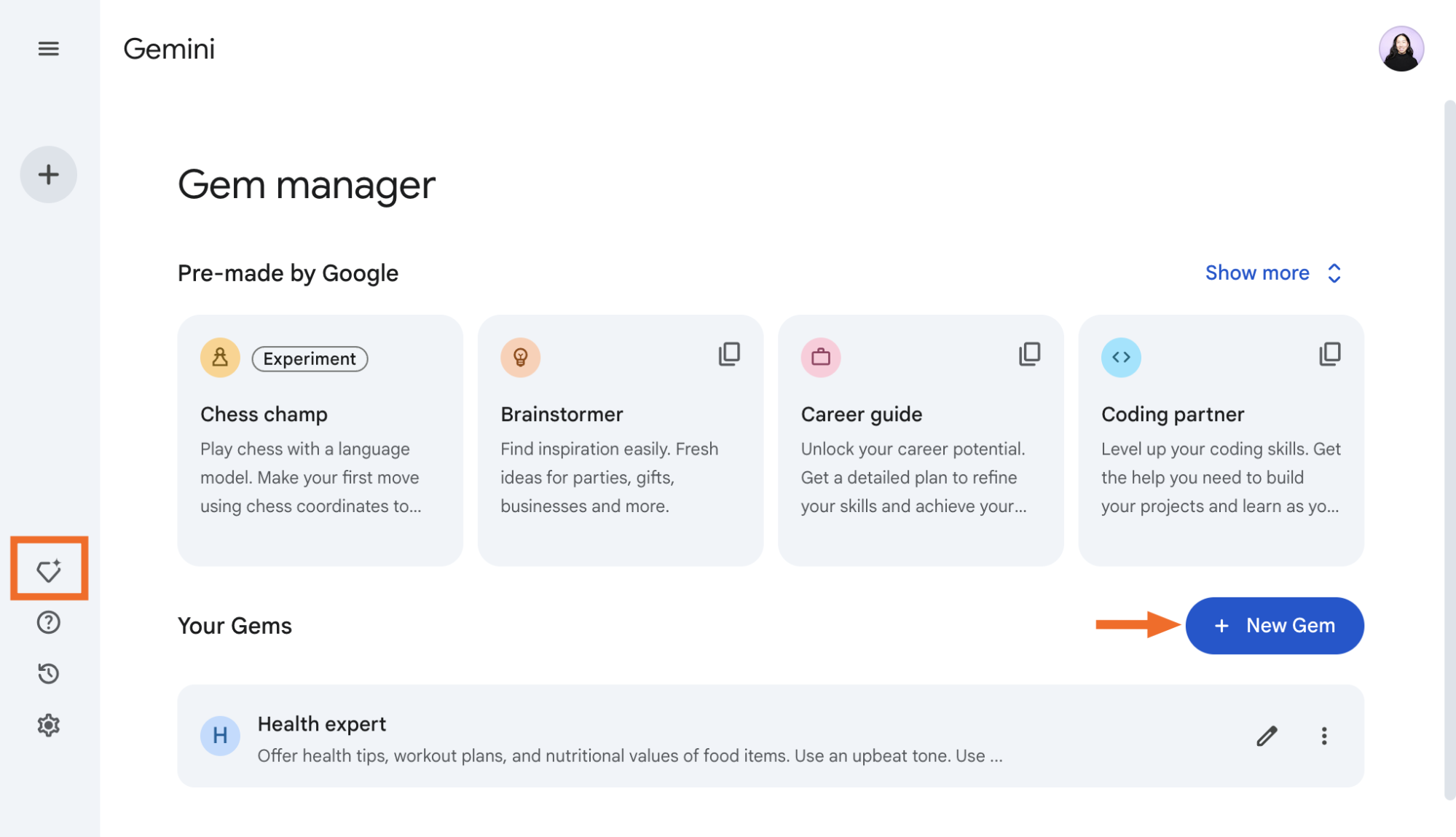
Gems are customized versions of Gemini that can be configured for repeated tasks or specialized help. Google’s Gems guide explains that Gems tailor responses around recurring goals and guidelines in Gemini Apps. (support.google.com)
A business can create Gems for:
- proposal drafting
- customer support replies
- blog outline creation
- social media captions
- sales call preparation
- HR policy review
- training content
- product description writing
- weekly report summaries
Example Gem instruction:
You are our SME marketing assistant. Write in clear, practical language for African small-business owners. Avoid hype. Focus on WhatsApp, trust, affordability, customer follow-up, and measurable sales outcomes.
This saves time because you do not need to repeat your brand instructions every time.
8. Use Canvas for Drafting and Editing Bigger Work
Gemini Canvas can help create and edit longer documents, apps, slides, and code inside Gemini Apps. Google’s Canvas guide explains that users can collaborate with Gemini in Canvas to create or edit documents, apps, slides, or code. (support.google.com)
Use Canvas for:
- business plans
- course outlines
- landing page drafts
- training manuals
- internal guides
- presentation outlines
- website copy drafts
- campaign documents
Canvas is useful when the task needs refinement, not just a quick answer.
The Best Prompt Formula for Business Owners
Use this structure:
Role: Tell Gemini who to act as.
Goal: Explain what you want.
Context: Describe your business, audience, market, and constraints.
Input: Paste relevant notes, data, or examples.
Output: Specify the format.
Tone: Define the writing style.
Limits: Mention length, language, budget, or exclusions.
Example:
Act as a business productivity consultant. Create a weekly Google Workspace workflow for a 5-person marketing agency in Cameroon. The team uses Gmail, Drive, Docs, Sheets, Meet, and WhatsApp. Output a practical table with daily routines, file-management habits, meeting rules, and follow-up responsibilities. Keep the tone simple and operational.
The better the prompt, the better the output.
Safety and Data Discipline
Gemini is useful, but business data still needs discipline.
Google’s Workspace privacy documentation says that for users with Google AI plans, content used with Gemini in Gmail, Calendar, Chat, Docs, Drive, Sheets, Slides, Meet, and Vids remains under the user’s control, and Workspace content is not used to train or improve Gemini or other generative AI models without permission. (support.google.com)
Still, businesses should create internal AI rules:
- Do not paste sensitive client data unnecessarily.
- Do not ask Gemini for final legal, medical, tax, or financial advice.
- Verify facts before publishing.
- Review all customer-facing content.
- Keep confidential documents inside approved business accounts.
- Train staff on what they can and cannot upload.
- Use admin controls where available.
AI should improve professionalism, not create careless exposure.
A Simple 30-Day Gemini Adoption Plan
Week 1: Email and Writing
Use Gemini for email replies, summaries, and document drafts.
Week 2: Files and Meetings
Use it to summarize documents, prepare meeting agendas, and extract action items.
Week 3: Marketing
Use Gemini to build campaign ideas, content calendars, buyer personas, and ad copy drafts.
Week 4: Systems
Create templates, Gems, checklists, sales trackers, and repeatable workflows.
At the end of 30 days, review what saved time, what improved quality, and what still needed human correction.
Gemini Works Best With Clear Business Thinking
Google Gemini can help businesses work faster, but speed is not the same as strategy.
Use it to summarize, draft, research, plan, organize, and improve. Let it help with emails, documents, spreadsheets, marketing campaigns, customer analysis, and repeated business tasks. But keep human judgment in control.
The businesses that benefit most from Gemini will not be those asking random questions. They will be the ones building repeatable workflows: better prompts, clearer documents, organized files, verified research, stronger marketing, and disciplined review.
AI becomes valuable when it improves how the business thinks, communicates, and executes.